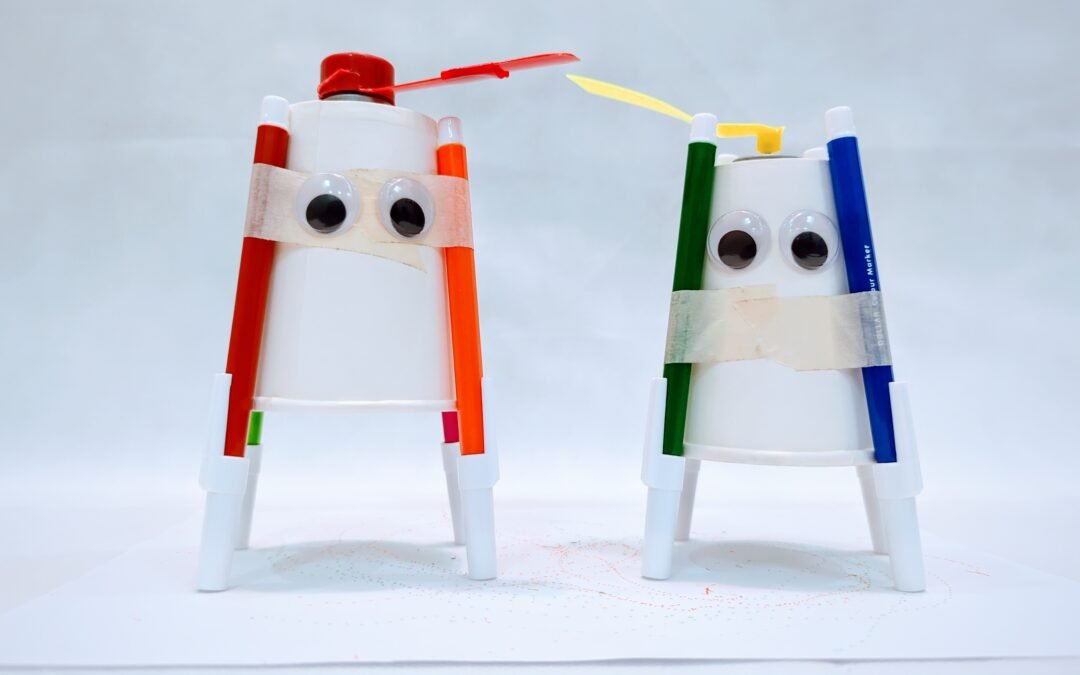
Create your own art bot using a cup, DC motor, and battery to make a fun drawing robot. This exciting STEM activity combines creativity and basic electronics to show how vibration and motion can create unique patterns and designs.
Difficulty Level: Easy to Medium
Concepts: Robotics, Electronics
Materials List
- Paper cup
- Small DC motor (R300C or similar)
- Coin cell battery (CR2032)
- Coin cell holder
- 3 sketch pens or markers
- Tape
- Glue
- Small plastic fan/propeller
- Scissors
Steps
- Prepare the cup body
- Turn the paper cup upside down — this will be your robot’s body.
- Attach the legs (markers)
- Tape 3 markers evenly around the cup so they act like legs.
- Fix the motor on top
- Attach the DC motor to the top of the cup using tape or glue.
- Create imbalance
- Attach a small fan/propeller to the motor shaft and remove 1–2 blades to make it unbalanced.
- Connect the power
- Attach the motor wires to the coin cell battery (use a holder if available).
- Turn it on
- Once powered, the motor will spin and create vibrations.
- Let it draw!
- Place the bot on paper and watch it move and draw crazy patterns 🎨🤖
Science Behind It
This project explores vibration, motion, and basic circuits.
Electrical Energy → Motion
The battery sends electricity to the motor, making it spin.
Unbalanced Motion
By removing blades from the fan, the spinning becomes uneven.
This creates vibration instead of smooth rotation.
Random Movement
The vibrations cause the robot to:
- Shake
- Move in different directions
- Draw unique patterns
Science Meets Art 🎨
Every drawing is different because:
- Small changes in balance affect movement
- Surface friction changes direction
This is similar to how:
- Mobile phones vibrate 📱
- Machines use vibration in real applications
Watch the video!
Keywords: art bot project, drawing robot for kids, STEM art project, DC motor experiment, vibration robot, STEAM activity, DIY drawing robot, simple electronics project, kids robotics activity